
If starting a blog has been sitting in the back of your mind for some time, it might be worth giving it some attention now.
Maybe you want a quiet corner of the internet that’s entirely yours, somewhere you can share what you know without needing to be on camera. You can run a blog almost entirely behind the scenes and still turn it into real income. You’ll never feel fully ready, so don’t wait for that feeling to show up.
I’ve been doing this for years now. I still didn’t have it figured out on day one. The clarity came from doing it, not from waiting until I felt prepared.
Pick a Niche You Can Live With
Don’t chase the most profitable topic on day one. That’s a good way to spend months thinking instead of writing. A better starting question: what do people already come to you for advice on? What have you already solved in your own life that someone else is probably still stuck on?
Popular niches aren’t a trap, they’re proof of concept. If a topic already has an audience searching for it, that’s a signal, not a warning sign to avoid it. The job then is standing out inside a crowded space rather than being the only one there. The opposite approach works too: a narrower, less-covered niche means less competition, but also a smaller pool of people looking for it in the first place. Neither is wrong, they’re just different bets.
If nothing feels obviously right, start broader. Let the topic narrow itself as you write and see what actually gets a response. Your niche a year from now will probably look different from your niche on day one. That’s normal, not a sign you picked wrong.
Getting the Tech Out of the Way
Choosing Platform
Choose your blogging platform before domain or hosting.
Self-hosted WordPress is worth the slight learning curve over something like Squarespace or Wix, and it comes down to ownership.
On a self-hosted setup, the content is yours outright. No platform can change its terms, shut down, or lock you out of your own writing. That’s not true of every website builder, and it’s worth knowing that going in rather than discovering it later.
Buy Your Domain Name
Keep it short and easy to say out loud without explaining it. Skip hyphens and numbers where you can.
A dotcom (.com) is worth prioritizing over other endings, .co and .online exist, but .com is still what people type by default, and it carries a slight edge for search visibility.
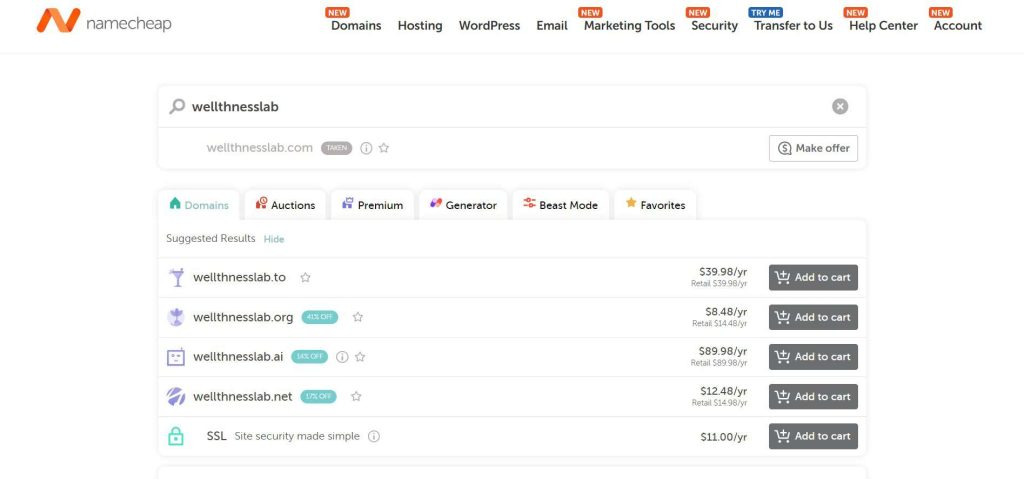
Namecheap is where I register mine, competitive pricing and it includes domain privacy for free on most domains. Two things worth confirming when you register:
- Domain privacy protection. Without it, your legal name and home address become searchable by anyone who looks up your domain through public registry records. Some registrars charge extra for this. Namecheap doesn’t, but check before you buy.
- SSL encryption. This is what shows visitors and Google that the site loads safely. It’s standard now, not an upgrade.
It’s also worth checking whether your domain name, or something close, is available on Instagram or other platforms, so your brand looks consistent wherever someone finds you.
Choose Hosting That Won’t Slow You Down
This is where a lot of new bloggers unknowingly hurt themselves. Budget shared hosting puts your site on the same server as hundreds of others. When one of those sites gets a traffic surge, everyone on that server feels the slowdown, including you.
Google has built entire tools around measuring page speed because it factors directly into rankings, and a page that takes more than about five seconds to load loses most people before they even see it.
I learned this the expensive way. My first host was fine for about eight months. Then my site started getting decent traffic, and one day that traffic spiked, but my hosting server couldn’t handle it. The site slowed down, and that ended up hurting my Google rankings too. That’s when I moved to Cloudways, which runs your blog on dedicated resources instead of shared ones. Their 1GB plan is enough if you’re starting out.
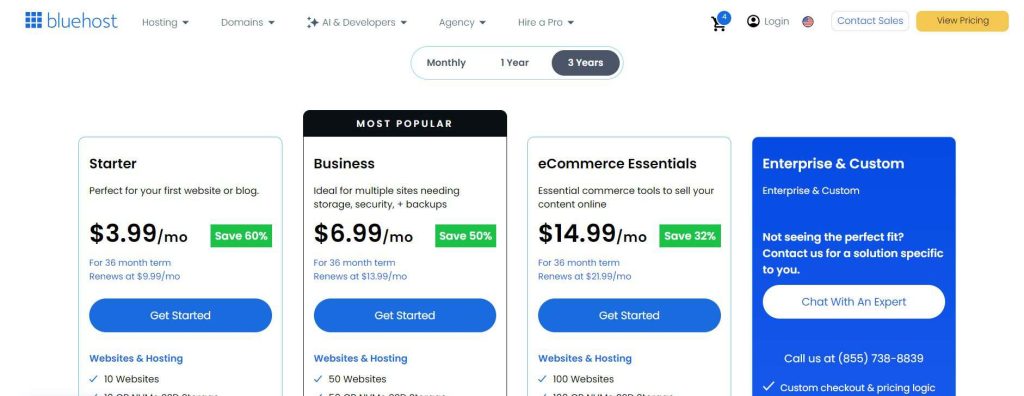
If you’re just starting out and don’t want to break the bank, you can go with a popular hosting provider like Bluehost. They have different plans depending on your budget and how much traffic you’re expecting. As your site grows and gets more visitors, you can upgrade to a faster plan or move over to a cloud-based provider like Cloudways for better speed and reliability.
Pick a Theme
Look for a theme that’s fast, mobile-friendly, SEO-friendly, regularly updated, and easy to customize.
Some popular beginner-friendly themes are Astra, Kadence, and Blocksy. I’ve used all of these, they’re great, you can’t go wrong with either.
Go to Appearance, then Themes, and install Astra. It’s fast, which matters for SEO, and flexible enough for a beginner site. Activate it, then go to Appearance, Starter Templates, and pick a design from categories like personal blog, travel, food, or wellness. Some templates are paid, plenty are free.
If you’re on Cloudways, Astra Pro (normally $59/year) is often included free: Add-ons, View All Add-ons, find Astra Pro, subscribe.
If design genuinely isn’t your thing, buy a pre-made template from a marketplace and just plug in your own colors and images. I lost three weekends the first time arguing with myself over a color palette. A template would’ve saved me all three.
Install the Plugins That Actually Matter
Plugins can slow a site down as easily as they help it, so the list stays short:
| Plugin | What it does |
|---|---|
| Rank Math or Yoast | Handles on-page SEO |
| Wordfence (Advanced) or Loginizer (Basic) | Blocks brute-force login attempts |
| Akismet | Filters spam comments automatically |
| UpdraftPlus | Backs your site up weekly |
| WP Rocket (Advanced) or WP Super Cache (Basic) | Improves website’s performance |
Add plugins one at a time and check your load speed after each. It’s the only reliable way to catch one that’s quietly dragging your site down.
Start Writing
Once you’re all done setting up your website, start writing content.
There’s a common myth that you need 20 posts finished before launching. You don’t. Three to five high-value posts that solve a specific, real problem will do more than twenty rushed, generic ones.
Write assuming most people read it on a phone. Shorter paragraphs, clear headers, bullet points where they genuinely help rather than just for looks.
As for AI: it’s fine for outlining or brainstorming when you’re stuck. Writing full posts with it tends to read flat, and readers notice faster than you’d think. If a paragraph in your draft could sit on someone else’s blog unchanged, cut it and write the version only you could write.
Getting Found On Google
Learn Basic Keyword Research
Search visibility comes down to keyword choice more than most beginners expect.
You’re not trying to rank for broad, competitive terms out of the gate, a brand-new site simply can’t compete there yet. You’re looking for topics with real search interest and low enough competition that you actually have a shot.
Longer, specific phrases tend to work better early on. Compared to just “Meal prep ideas,” the phrase “Meal prep ideas for night shift workers” has a better chance of ranking for new websites.
Two ways to keyword research:
- Free: type your topic into Google and see what it auto-suggests as you type. That’s real demand showing up for free.
- Paid: a tool like Semrush estimates a keyword’s difficulty based on your site’s current authority. It’s useful once you want more precision and data.
Don’t obsess over keyword tools, though. Focus on understanding what your audience is actually searching for and creating the best answer possible.
Set a Posting Rhythm
Consistency beats volume here. One solid post a week, sustained for at least a year, tells search engines your site is active and worth crawling regularly.
If you can manage two posts a week, that’s better, but a dependable one beats an inconsistent two.
Somewhere in your first several months, write a few longer, in-depth posts, 2,500 words or more, on your core topics. These become reference points. Shorter, related posts can link back to them, which helps search engines understand which page on your site is the actual authority on that subject.
Build Your Traffic Sources
Traffic Through Pinterest
Pinterest is my favorite source of early traffic. It behaves like a search engine rather than a social feed: people go there actively looking for ideas, which is why it works so well for blogs. There are other ways as well you can use to make money with Pinterest, here’s the post that talks about them.
Build vertical images in Canva with clear text overlays, and treat the pin title and description like a page title, with real keywords in them. Do this manually at first so you understand what’s actually working.
Once you’re publishing enough content that manual posting becomes unsustainable. Something like 10-15 pins a day on an established blog, a tool like BlogToPin can automate it.
Traffic Through YouTube
Blogging and YouTube pair well for a similar reason: both are search-driven rather than feed-driven, so one piece of content can keep getting found years later.
A reasonable order of operations is spending your first several months on the blog, SEO, and Pinterest, then adding YouTube once you’ve got a backlog of posts worth turning into video.
Here’s my honest opinion on the rest of social media: skip it for the first year. Not because it doesn’t work eventually, but because running four new platforms while also building a blog usually means none of them get enough consistent effort to actually work. I wasted my first four months trying to post on Facebook, Instagram, Pinterest, and Twitter at once. Only Pinterest sent real traffic. Once I dropped the other three, my page views doubled within a few months.
Build an Email List
Social platforms and search rankings can both shift overnight in ways entirely outside your control. Your email list is the one audience that stays yours regardless of what an algorithm decides.
Set up a signup form with a free lead magnet, a checklist or short guide works fine, from day one. Don’t wait for traffic to justify it.
I use the Grow plugin by Mediavine that collects emails through on-scroll forms, and can auto-generate a weekly newsletter from your latest posts if you genuinely don’t have time to write one by hand. I also integrated Kit (formerly ConvertKit) with it so I can have more control over the emails and to do a lot more than just collecting emails.
Making Money Without a Fantasy Timeline
A realistic first year probably doesn’t include a five-figure or even four-figure monthly income. Most bloggers who eventually replace a full-time income took a year or more to get there.
Early on: publish weekly, grow your list, and add affiliate links to your top posts early instead of saving that step for “later.” Once you cross 10,000 monthly sessions, entry-level ad networks like Mediavine’s Journey program become available (Journey now accepting websites with over 1,000 monthly sessions).
Months 6 to 12: apply to a full ad network, Mediavine at 50,000 monthly sessions, or Raptive at 100,000, once your traffic supports it. I know 50,000 sessions in one year is difficult but doable if you get lucky. This is also when it’s worth reading your own analytics closely: find your best-performing posts and build more content around whatever’s already working.
Affiliate marketing
Amazon is usually the easiest entry point:
- Associates program: start linking immediately, though there’s typically a minimum sales threshold, often around $100, to hit within your first 90 days to stay active.
- Influencer Program: build an actual storefront to group recommendations together, useful for showcasing a full set of related products instead of linking them one at a time inside a post.
We have a guide on affiliate marketing and how you can make money with it, you should definitely check it out.
Digital products
Once you have an audience to sell to. Ebooks are the most approachable: write out what you know, format it in Canva, sell it through something like Shopify. These pair naturally with blog content too.
A post about a specific recipe category can promote a related ebook, which can then recommend the products used in those recipes.
Here are more ways to make money with blogging.
Final Thoughts
Blogging has changed, but it certainly isn’t dead.
Success today isn’t about publishing hundreds of articles or chasing every algorithm update. It’s about consistently creating genuinely helpful content, building trust with your audience, and distributing your content through channels like Google, Pinterest, YouTube, and email.
You don’t need to be the best writer, have expensive equipment, or know everything before you begin. Start with one helpful article, learn as you go, and stay consistent. A year from now, you’ll be glad you started today.